Welcome to our getting started with the GPD Pocket 4 guide. The GPD Pocket 4 is a cutting-edge ultra-mobile PC (UMPC) that combines the power of a desktop computer with the portability of a pocket-sized device. Featuring the AMD Ryzen AI 9 HX 370 processor and AMD Radeon 890M, this compact device packs impressive performance into a tiny form factor.
The Pocket 4 is designed for professionals and enthusiasts who need a fully-functional Windows PC in an ultra-portable package, offering a 8.8-inch touchscreen display and a clamshell design with a full keyboard. With its powerful hardware and versatile form factor, the GPD Pocket 4 is aimed at users who require high performance and flexibility in a truly pocket-sized computer.
Our getting started guide aims to help you hit the ground running with your new GPD Pocket 4, covering everything from initial hardware testing and software updates to optimizing your productivity experience and troubleshooting common issues. This guide will ensure you make the most of your new ultra-mobile PC, whether you’re using it for work, entertainment, or on-the-go computing tasks.
Inspect the GPD Pocket 4
When you first receive your GPD Pocket 4, we recommend performing an inspection to ensure everything is in working order:
- Check the device case/shell: Carefully examine the outer case for any cracks, dents, or other damage that may have occurred during shipping. Pay special attention to the clamshell design and hinge mechanism.
- Test all keyboard keys: Use https://keyboard-test.space/ to ensure all keyboard keys are registering correctly.
- Touchscreen functionality: Test every part of the touchscreen to ensure it responds correctly. Make sure you can interact with all corners and areas of the screen without any unresponsive zones.
- Verify clamshell mechanism: Test the clamshell design to ensure it opens and closes smoothly. Check that the screen holds its position at various angles.
- Test USB ports: Plug in common USB devices to ensure all ports are functioning properly.
- Check modular port(s): Connect appropriate cables and devices to the modular port. For example check USB output is working, RS-232, KVM modules.
- Verify audio output: Test the speakers and 3.5mm audio port to ensure clear audio output.
- Test Wi-Fi and Bluetooth: Ensure the Wi-Fi 6E and Bluetooth connections are working correctly
By thoroughly inspecting your GPD Pocket 4, you can ensure that all components are working as intended and address any issues promptly.
If you have any issues, here, at GPD Store we offer our full support. Just head over to our Contact Us page and reach out.
Update GPD Pocket 4 Windows & Drivers
Updating Windows 11
Keeping your GPD Pocket 4 up-to-date is crucial for optimal performance and security. Here’s how to check for and install Windows 11 updates
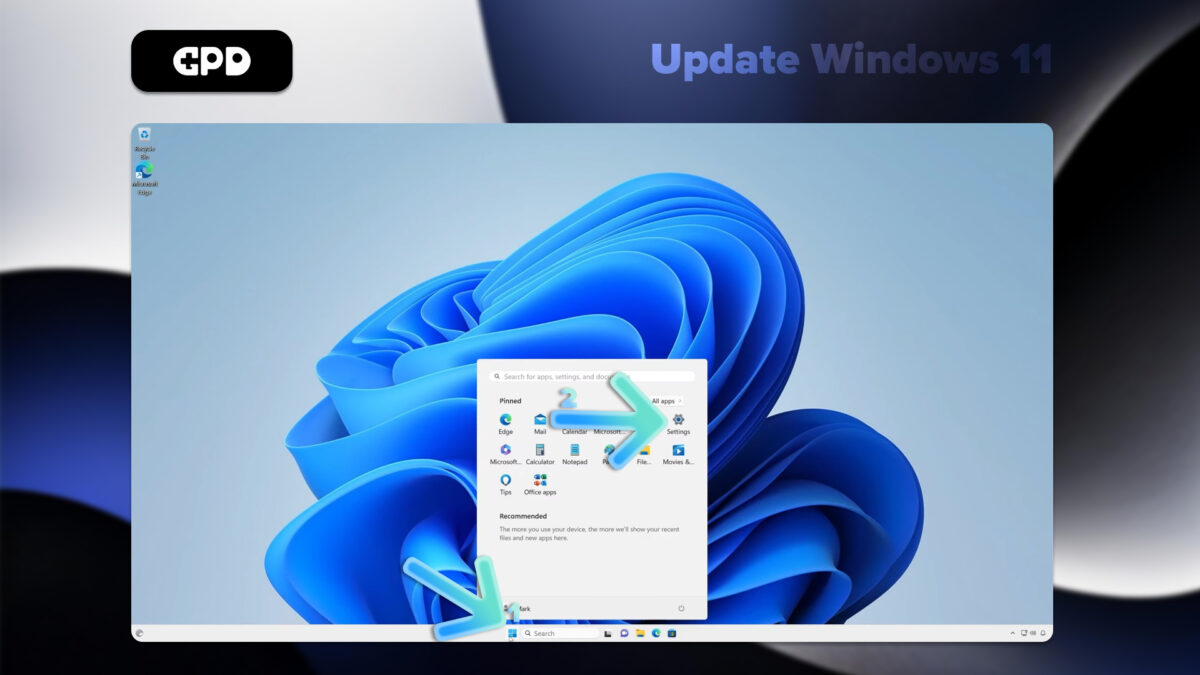
- Open the Start menu by clicking the Windows icon or pressing the Windows Key
- Select the Settings icon (gear symbol) or type “Settings” in the search bar and press RETURN(Enter).
- In the Settings window, click on “Windows Update” in the left sidebar.
- To check for available updates, click the “Check for updates” button.
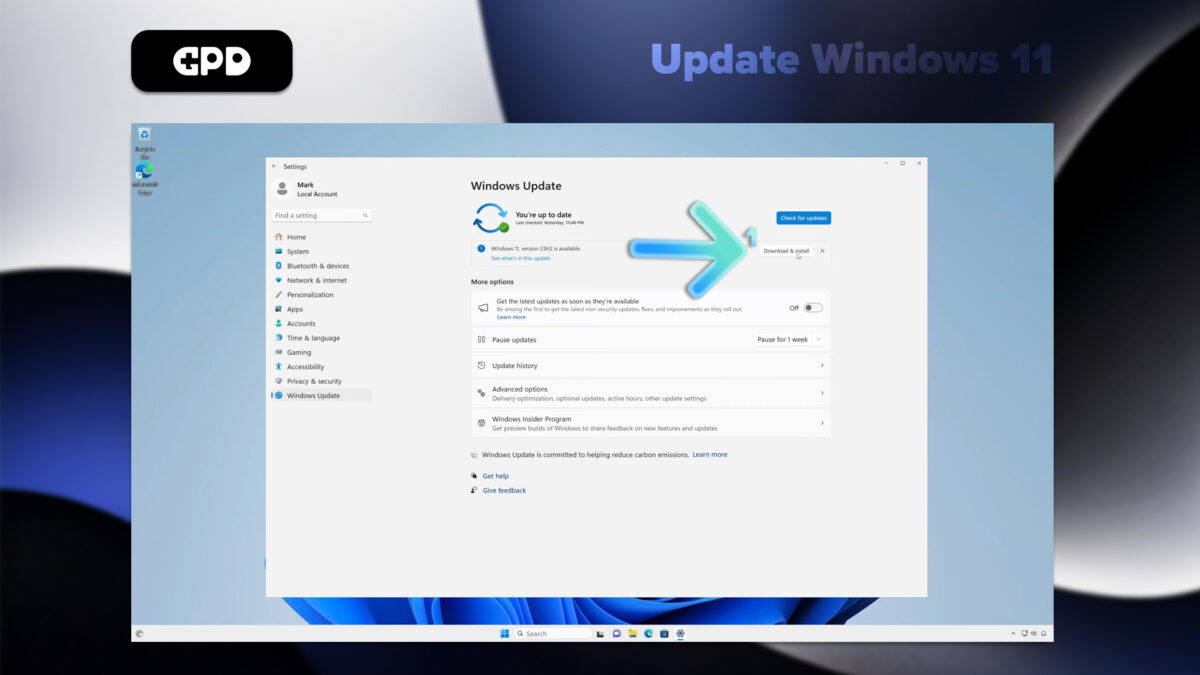
- If updates are available, Windows will begin downloading them automatically.
- Once downloaded, you may need to restart your GPD Pocket 4 to complete the installation process.
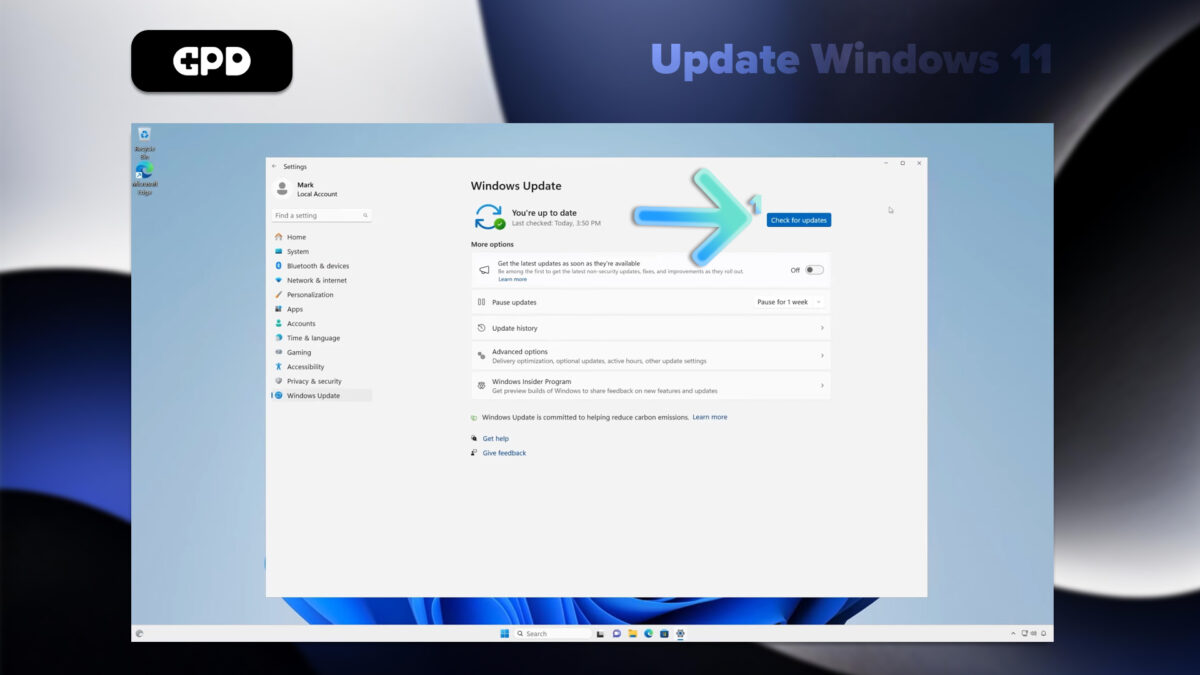
Note: Your GPD Pocket 4 is set to automatically check for updates, but it’s a good practice to manually check periodically. You can customize update settings by clicking “Advanced options” in the Windows Update menu
How to Update Drivers on the GPD Pocket 4
Windows Update
Windows Update is the simplest and most reliable method for updating most drivers:
- Open the Start menu and click on Settings (gear icon).
- Select “Windows Update” from the left sidebar.
- Click “Check for updates.”
Windows will automatically download and install available driver updates along with other system updates.
Device Manager
For more specific driver updates:
- Right-click the Start button and select “Device Manager.”
- Expand the category for the device you want to update.
- Right-click on the device and select “Update driver.”
- Choose “Search automatically for drivers.”
AMD Drivers Updates
Since the GPD Pocket 4 uses AMD processors, the AMD Auto-Detect driver updates will update the GPU and chipset related drivers.
- Download and install the AMD Auto-Detect and Install Driver Updates from here.
- Run the software and follow the prompts to choose what to update or install.
Note: Always download drivers from official sources to ensure system stability and security. While Windows Update covers most essential drivers, using the AMD tool can help keep AMD-specific components optimized for your GPD Pocket 4. By regularly updating your drivers, you’ll ensure your mini laptop maintains peak performance and compatibility with the latest software and hardware.
How to change the GPD Pocket 4 Modules
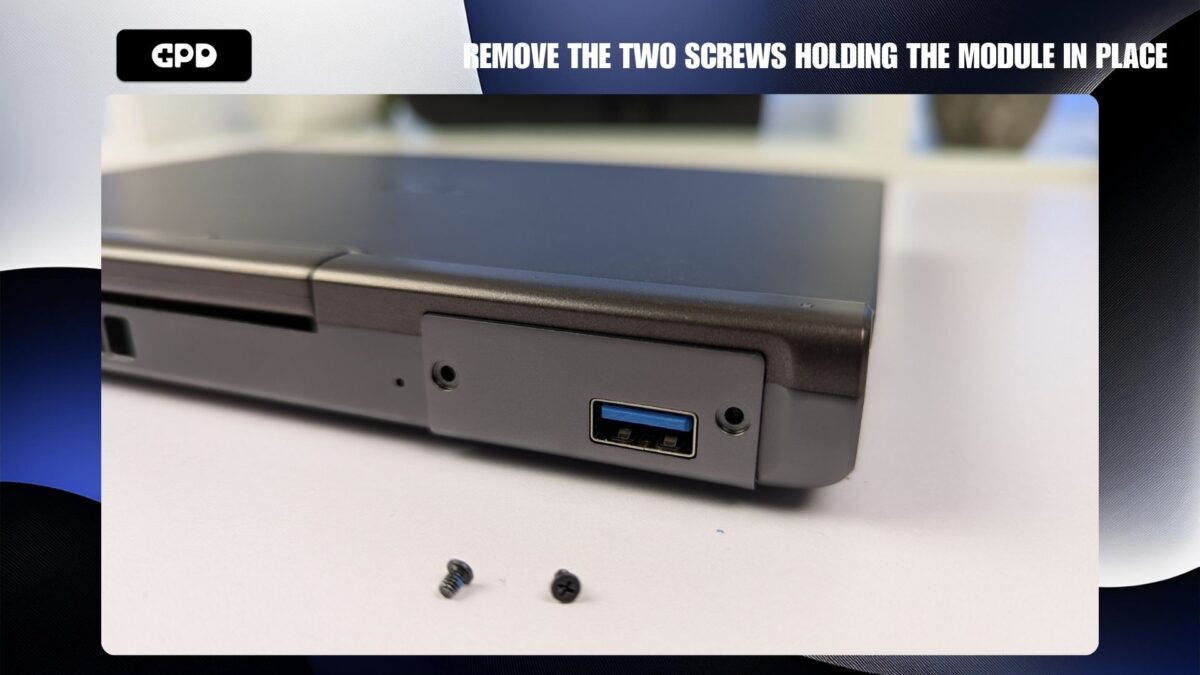
The modules on the GPD Pocket 4 can be very easily changed in a minute or two. Simply remove the two screws holding the module in place, remove the module, insert the replacement module and then screw the two screws back in place. We have a more detailed guide on how to change the GPD Pocket 4 modules here.
How to change the GPD Pocket 4 Module
Must-Have Software for the GPD Pocket 4
To maximize the potential of your GPD Pocket 4, consider installing these essential applications:
Performance Optimization
GPD MotionAssist: Essential for configuring TDP settings, gyro controls, and other device-specific features.
Gaming
Steam: The primary platform for PC gaming, offering a vast library of titles compatible with the Pocket 4.
RetroArch: For emulating classic games from various consoles.
Productivity
Microsoft Office or LibreOffice: For document editing and creation.
OneNote: Ideal for note-taking, especially with the device’s touch screen support.
Entertainment
VLC Media Player: A versatile media player for various video and audio formats.
Utilities
7-Zip: For file compression and extraction.
ShareX: A powerful screenshot and screen recording tool.
Development
Visual Studio Code: A lightweight, versatile code editor suitable for coding on the go.
Security
Malwarebytes: Additional protection against malware and viruses.
Customization
AutoHotkey: For creating custom keyboard shortcuts and macros, which can be particularly useful on the compact keyboard of the Pocket 4.Remember to adjust in-game settings for optimal performance, as the Pocket 4 performs best when you balance visuals with frame rates
Must Have Accessories For Your GPD Pocket 4
GPD G1 eGPU Docking Station
The GPD G1 is an impressive accessory for the GPD Pocket 4, offering a significant performance boost through its powerful external GPU and enhanced connectivity options, transforming the device into a desktop-class system for gaming and productivity.
- Equipped with the AMD Radeon RX 7600M XT GPU, the GPD G1 delivers desktop-level graphics power, perfect for handling demanding games and applications.
- It features multiple display output options such as HDMI 2.1 and DisplayPort 1.4a, allowing for multi-monitor setups and smooth, high-refresh-rate gaming.
- The docking station also adds extra USB ports and a high-speed SD card reader, expanding connectivity and storage options.
- With its compact and portable design, the GPD G1 is easy to carry alongside the Pocket 4, providing on-the-go performance boosts.
- Thanks to its support for USB 4.0 (and OCuLink on supported devices), the GPD G1 is compatible with a wide range of devices, making it useful beyond just the Pocket 4.
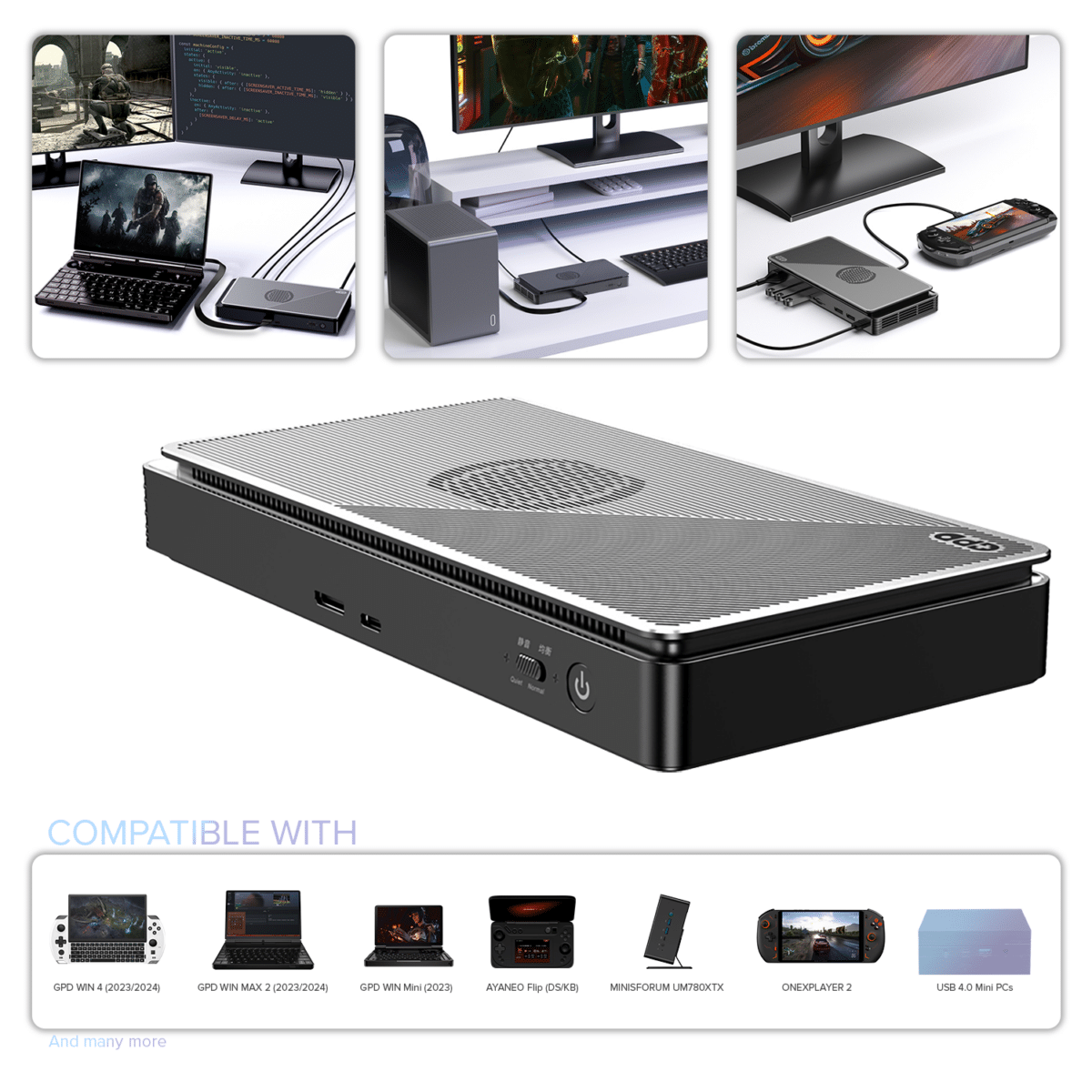
GPD G1 (2024) eGPU Docking Station
$690.95
DROIX PM14 portable monitor
The DROIX PM14 is a highly versatile 14-inch 4K Ultra HD portable monitor that enhances the functionality of the GPD Pocket 4, offering an expanded visual workspace for gaming, productivity, and content creation. Its high-resolution display, touchscreen capability, and wide color gamut make it an ideal companion for the compact handheld PC.
- The PM14 features a crisp 4K (3840×2160) resolution display with 100% DCI-P3 color accuracy, providing stunning visuals for gaming and media use.
- With Mini HDMI and USB-C ports, it offers versatile connectivity, ensuring compatibility with various devices, including the GPD Pocket 4.
- The monitor is available in both touch and non-touch versions, giving users the flexibility to choose based on their needs.
- Weighing only 578g and with a slim design, the PM14 is easy to carry and perfectly complements the portability of the GPD Pocket 4.
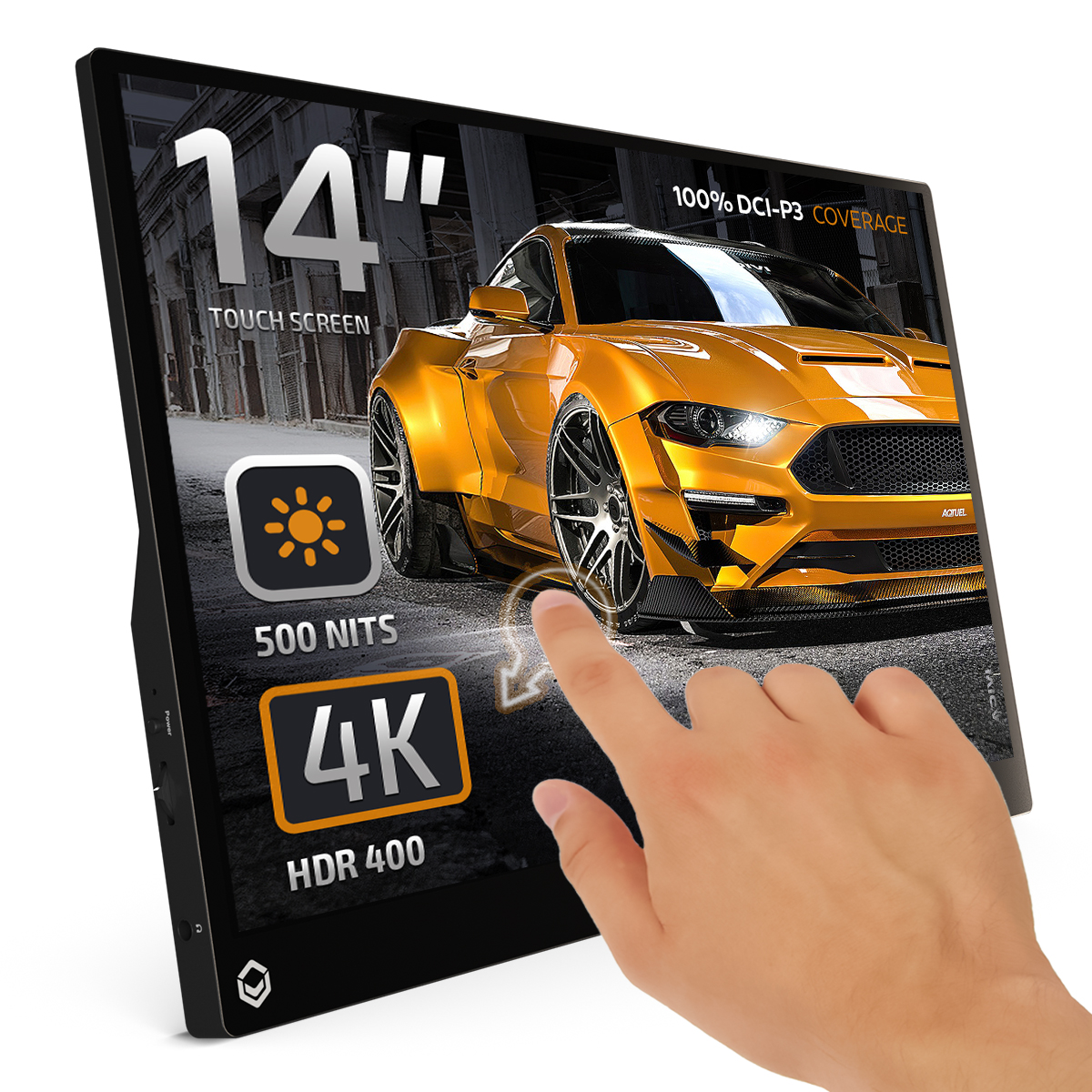
DROIX PM14 4K Portable Monitor
160.95Price range: 160.95
Where to buy the GPD Pocket 4
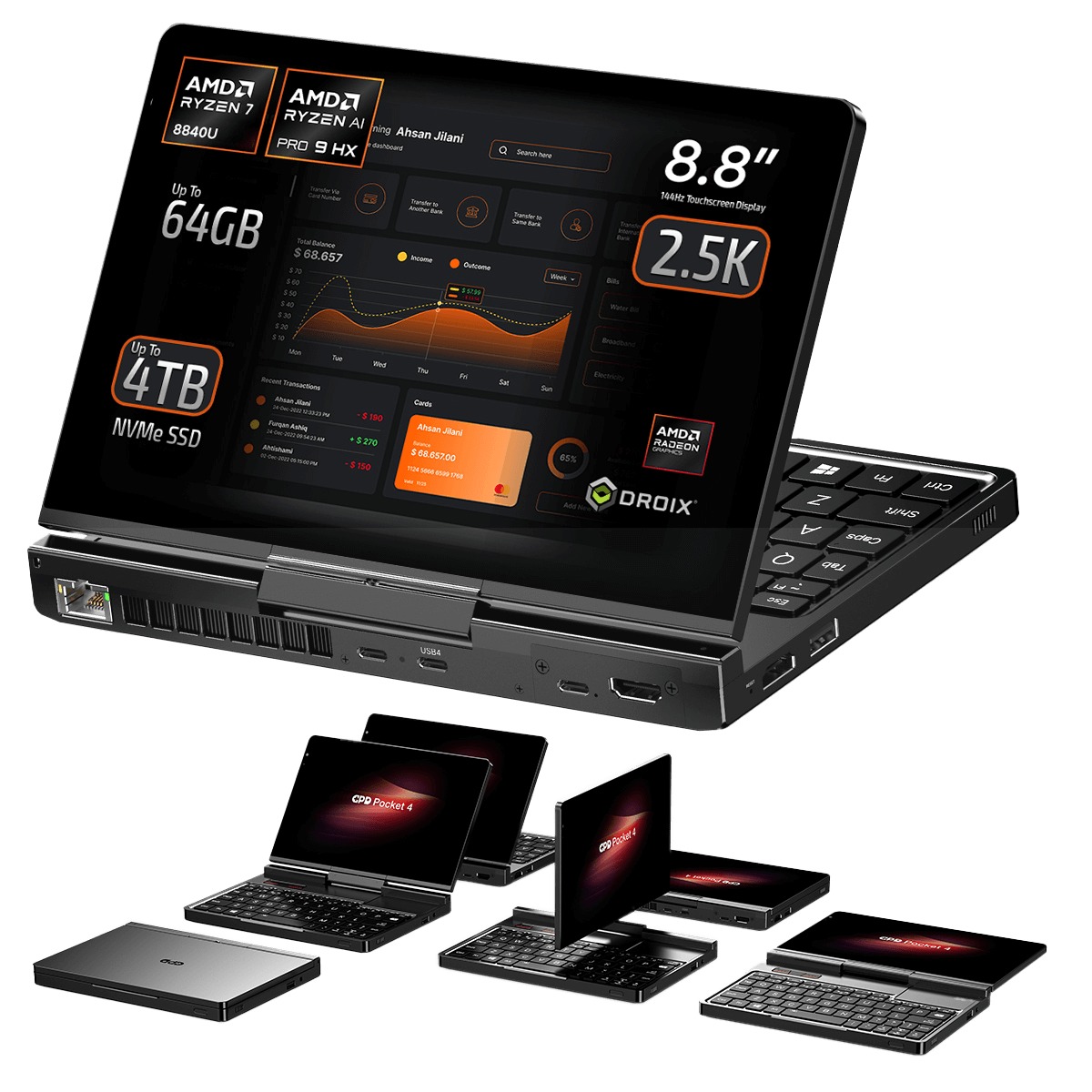
GPD Pocket 4 Mini Laptop
- AMD Ryzen™ 7 8840U / AI 9 370 / Radeon™ 780M / 890M
- Up to 64GB LPDDR5X @ 7500 MT/s
- Up to 4TB High-Speed PCI-E 4.0 NVMe SSD
- Thunderbolt 4 / 8.8″ Touchscreen Display / Fingerprint Scanner
- Modular with RS-232/KVM/4G LTE Ports (Sold Separately)

PAYMENT INFO
We use the latest technology in Payment Processing, which allows you to checkout via your Debit/Credit Card, or PayPal for a fast and secure experience.
WARRANTY
2 Years Warranty from DROIX Global for your peace of mind
QUALITY ASSURANCE & PRE-DISPATCH TESTING
Ensuring Customer Satisfaction at the Highest Standard: Every device undergoes rigorous testing and a multi-point quality assurance check before it is shipped. Our dedicated team verifies performance, functionality, and component integrity to guarantee your GPD device is in perfect working order upon arrival, providing you with confidence and peace of mind.
PRICING, TAXES AND SHIPPING
Note:
- United States Customers: The displayed price does NOT include TAX nor duties. Liability to clear customs and pay any associated tax/duties lies on the customer.
- EU Customers: The displayed price includes applicable TAX, which may be up to 25% depending on your country.
- Canada Customers: The displayed price includes applicable taxes, which may include 5% GST and additional Provincial Sales Taxes (PST), Harmonized Sales Tax (HST), or Quebec Sales Tax (QST), depending on your province.
For Our USA Customers: Orders are dispatched DAP (Delivered At Place). While customers are responsible for payment of any applicable tariffs, we draw on our extensive experience shipping from the UK to ensure you pay the least possible charge. Based on our records, these charges typically do not exceed 10% of the item value.
For EU Customers ONLY: Express DDP (Delivered Duty Paid). This means:
- All customs duties and taxes are included in the price displayed on the product page.
- You will not need to pay any additional charges upon delivery.
- In the rare event of customs-related issues, our team will handle the customs clearance process on your behalf to ensure a smooth delivery experience.
Important Information About Returns:
- If you decide to return your order or request a refund, please be aware that taxes and duties paid on your behalf under DDP terms cannot be refunded.
Please refer to our Terms & Conditions for detailed information.
CUSTOMER SUPPORT
Got a question? We’re a short text away from having your issue sorted!
Please refer to our Terms & Conditions for detailed information.
WHAT’S INCLUDED
- 1x GPD Pocket 4 Mini Laptop
- 1x USB Type-C Cable
- 1x Power Plug (EU/US)
- 1x User Manual
2,369.95Price range: 2,369.95
Frequently Asked Questions
GPD Pocket 4
-
When will the GPD Pocket 4 launch?
No date has been announced for the GPD Pocket 4 launch. We expect it to launch in early 2025, around January/February. Once we have a date we will update here as well as on the product listing page.
-
What warranty do you get when buying the GPD Pocket 4?
You get a two year warranty when buying from GPD Store, other sellers may only provide one year.
-
What are the GPD Pocket 4 speakers like
The GPD Pocket 4 comes with dual built-in 2W ultra-linear speakers, delivering twice the sound power of the previous generation. Both the speakers and headphones support DTS Ultra audio technology, creating a simulated 7.1-channel surround sound experience for immersive, cinema-quality audio.
-
What is the GPD Pocket 4’s body made from?
The Pocket 4 features a 6061 series full aluminum body crafted with Apple’s Unibody design through CNC precision machining. The chamfering process is meticulously milled to remove burrs, and polishing and sanding give the surface a smooth, glass-like texture. A capillary effect distributes dye evenly into the material, while anodizing adds an ultra-protective layer. The body is further refined with magnetized iron powder polishing, achieving a jade-like smoothness. With 36 layered treatments, the Pocket 4 combines a lightweight build with remarkable durabi
-
What is the battery capacity of the GPD Pocket 4?
The GPD Pocket 4 has a 45Wh battery. Battery life will vary depending on usage but you can expect around 9 hours video playback.
-
What is the GPD Pocket 4’s size and weight? Is it portable?
The GPD Pocket 4 measures 8.14 x 5.68 x 0.87 inches (20.6 x 14.4 x 2.22 cm) and weighs 770g (1.69 lbs). It is extremely portable, fitting into a small bag.
-
What communications features does the GPD Pocket 4 support?
There is a 2.5Gbps RJ45 ethernet port for wired connection, and for Wireless there is WiFi 6E and Bluetooth 5.3 built-in as standard. 4G LTE is also available as a separately purchased 4G LTE module .
-
What processor does the GPD Pocket 4 have?
There is a choice of two processors:
AMD Ryzen 9 AI HX 370 with AMD Radeon 890M for the highest performance
AMD Ryzen 7 8840U with AMD Raedon 780M lower demanding software
-
How much faster is the Ryzen 9 AI HX 370 than the Ryzen 7 8840?
Performance will vary depending on the software used but overall the HX 370 vastly outperforms the 8840. For example in Geekbench 6 we see a 133% and 24% improvement on single and multi-core performance respectively.
-
What is the GPD Pocket 4’s AI performance?
The GPD Pocket 4 has a combined CPU/GPU/NPU of 80 TOPS. And with the GPD G1 it has a total of 108 TOPS.
-
What is the GPD Pocket 4 power adapter specification and wattage?
The GPD Pocket 4 comes with a 100W PD fast charger at 20V/5A. It can recharge your GPD Pocket 4 to 50% in around 30 minutes. It also supports 100W PD Power Banks.
-
How does the GPD Pocket 4 handle thermal management under load?
The GPD Pocket 4’s cooling system is designed with a pure copper vacuum condensation heat pipe, highly efficient full-copper heat sink fins, and ultra-quiet, smart hydraulic bearing fans. This new design boosts airflow by 23% over the previous generation, while an intelligent temperature control system dynamically adjusts cooling to minimize fan noise, keeping the device cool and quiet. For night time use, a “Silent” mode can be activated via the keyboard to reduce noise and avoid disturbing others.
-
How does the GPD Pocket 4 handle multiple display setups?
You can connect to three external monitors such as the DROIX PM14 via the HDMI 2.1 and two USB-C ports. With the GPD G1 eGPU docking station you can connect to five external displays; one via the built-in HDMI, and three via the GPD G1 single HDMI and dual DisplayPort.
-
What is the GPD Pocket 4’s maximum display resolution?
The GPD Pocket 4’s 8.8″ 144Hz display supports up to 2560×1600 resolution.
-
What is the modular port on the GPD Pocket 4 used for?
.The modular port allows for additional functionality through optional modules, such as RS-232 or KVM (Keyboard, Video, Mouse) capabilities. Learn more about them at https://gpdstore.net/gpd-pocket-4-modular-design/
-
Can the RAM and Storage be upgraded for the GPD Pocket 4?
It is not possible for the RAM to be upgraded as it is soldered to the board. It is possible to upgrade the storage to 4TB and theoriticaly higher capacaties once available. The storage is single sided M.2 2280 SSD format.
-
Does the GPD Pocket 4 support Windows Hello?
The GPD Pocket 4 supports Windows Hello via the fingerprint scanner found on the power button.
-
What are the GPD Pocket 4’s camera specifications
The GPD Pocket 4’s built-in camera has a 2.5K high definition camera.
-
What modules are available for the GPD Pocket 4?
It has modular functionality with optional modules like EIA RS-232, Single-port KVM, microSD card reader, and 4G LTE expansion. Learn more about them on our blog post at https://gpdstore.net/gpd-pocket-4-modular-design/https://gpdstore.net/gpd-pocket-4-modular-design/
-
How fast is the GPD Pocket 4’s SD card module?
The GPD Pocket 4 Micro SD card module has a 160MB/s read speed and 120MB/s write speed.
-
Does the GPD Pocket 4 support external GPUs?
Yes, the USB4 port supports connecting external GPUs like the GPD G1 eGPU docking station . Note: The GPD Pocket 4 does not have an OCuLink port.
-
Does the GPD Pocket 4 support tablet mode?
Yes, the GPD Pocket 4 has a rotating display that allows it to transform between laptop and tablet modes.
-
Does the GPD Pocket 4 support stylus?
The GPD Pocket 4 supports a capacative stylus. An Active stylus such as the GPD Stylus will not work on the Pocket 4.
-
What operating system does the GPD Pocket 4 run?
The GPD Pocket 4 comes with a licensed Windows 11 Home pre-installed.